Effortless travel, naturally structured.

Forward any booking — flights, hotels, rental cars, tours, dinner tables — and your trip builds itself, then carries you there. A delay. A new gate. Turbulence ahead. Your bag’s belt. You’ll be the first to know.

Android beta by invitation: write to [email protected] · Coming to iPhone

TripCoral in one minute 0:59

Read the transcript
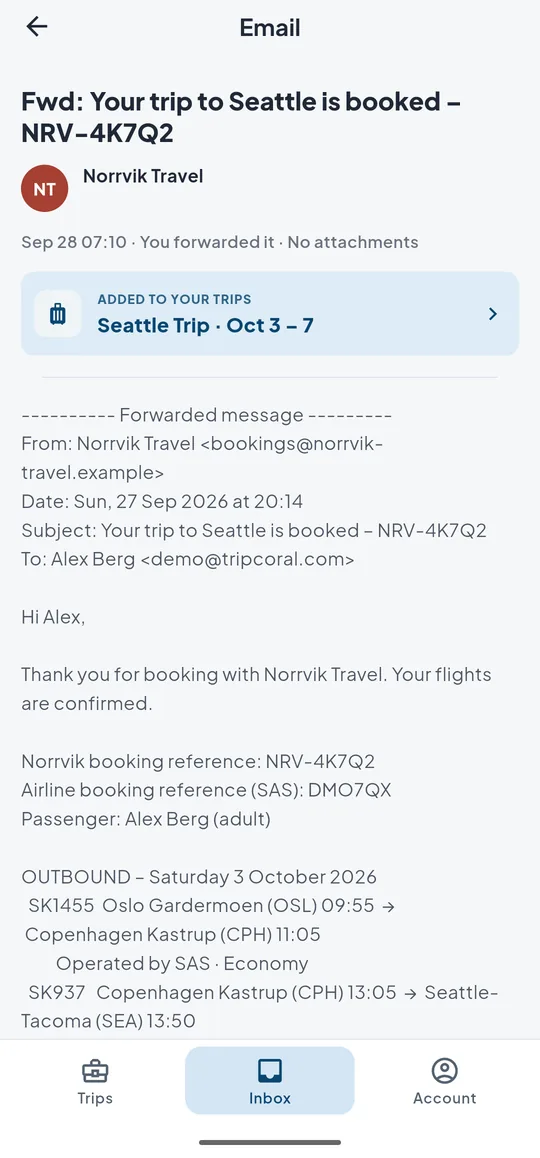
  1. Forward it. Nothing to type. A forwarded flight confirmation lands in the TripCoral inbox, marked “Added to your trips”: the Seattle trip, 3 to 7 October.
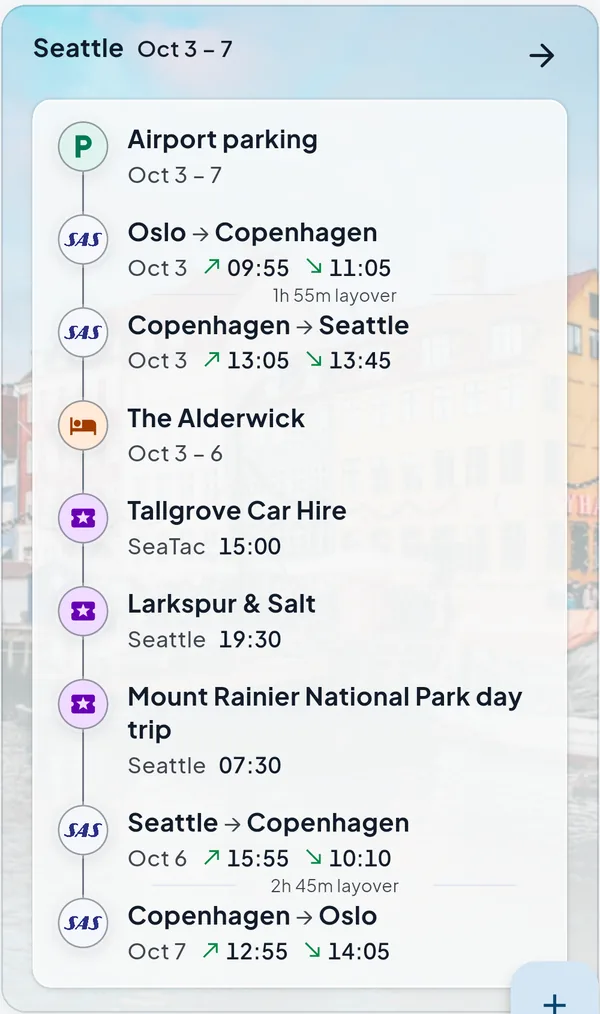
  2. Your whole trip, beautifully organized. The Seattle trip builds itself: airport parking, four flights, the hotel, the rental car, dinner and a day tour, in the order you’ll live them.
  3. Know your flight before you pack. On the web, SK 1421 from Stockholm to Copenhagen: the route, terminal 5, gate F36, check-in 71 to 82, and the Airbus A320neo flying it.
  4. Walk in knowing the queue. Wait times at Copenhagen, where the trip connects, on the web: 19 minutes at security and 3 minutes at passport control, with today’s queue by the hour.
  5. All set, three hours out. Three hours before departure, a push: “All set for Copenhagen. SK 1421 leaves in 3 hours at 11:00 · Terminal 5 · Gate F36 · Check-in 71-82.”
  6. A delay. A new gate. You’ll be the first to know. Another flight that morning, Ryanair FR 1502 from Oslo: 45 minutes late, now 10:05 instead of 09:20, and moved from gate D10 to D6.
  7. Your flight, followed live. The live card for SK 1421: off the gate at 10:58 and taxiing, then in the air and due in Copenhagen at 12:14, with the connecting SK 1466 to Oslo at 13:45.
  8. Landed. Your connection, lined up. On landing in Copenhagen, a push: “Welcome to Copenhagen. SK 1421 · Terminal 3 · Gate D3.” The live card counts down to the connecting flight: SK 1466 to Oslo at 13:45, 1 hour 39 minutes away.
  9. Your next gate, and the way there. The layover row reads “Layover in CPH · 1h 39m · 840 m walk”. One tap opens the Copenhagen terminal map with the path from gate D3 to gate B15: an 840-metre, 12-minute walk.
  10. Welcome home. Bags at belt 4. Landing in Oslo, a push: “Welcome to Oslo. SK 1466 · Bags at Belt 4.” The live card shows the landing at 15:18, 23 minutes late, and bags on belt 4.

Everything you need to travel with confidence.

Built on a robust and reliable foundation: one timeline, kept current, in your pocket.

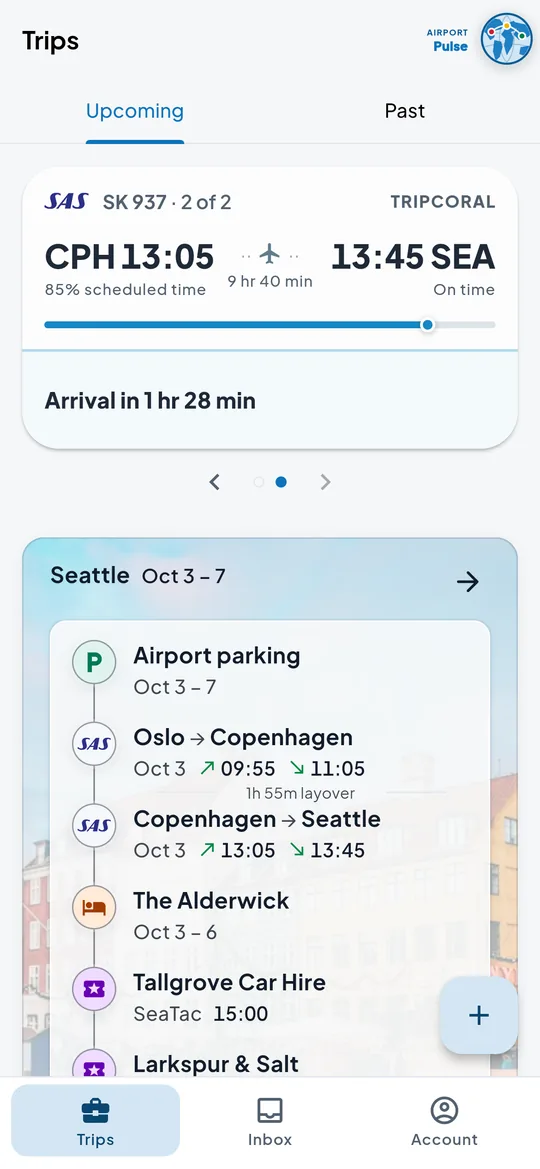
The Seattle trip in TripCoral on Android: airport parking, four flights, a hotel, a rental car, dinner and a day tour on one timeline

The single source of truth

Forward your confirmation emails to [email protected] and watch your itinerary build itself. Flights, hotels and activities — anything you’ve booked, from a rental car or guided tour to concert tickets and restaurant reservations — become readable cards on one cohesive timeline.
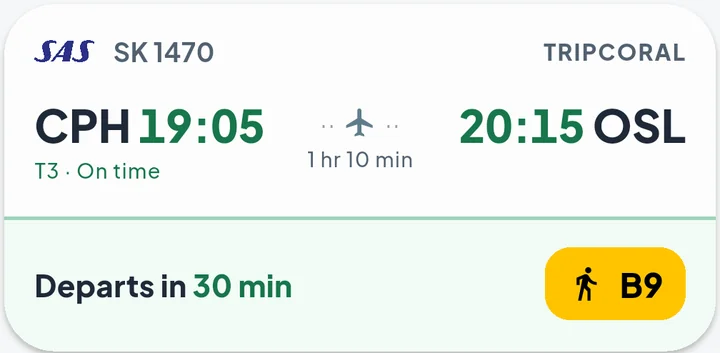
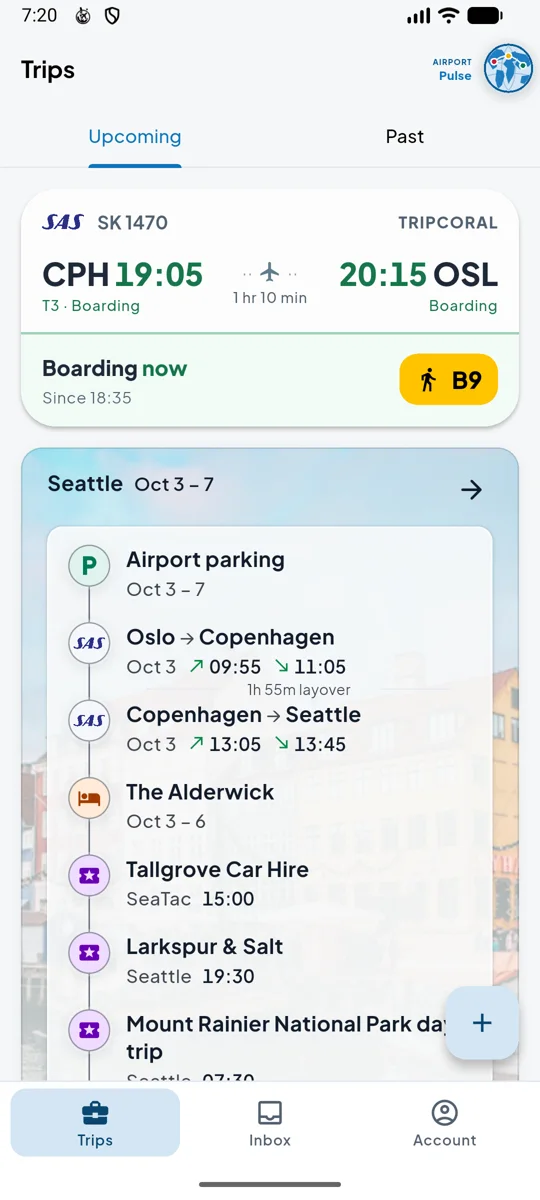
The live card for SK1470 Copenhagen to Oslo, on time from terminal 3: departs in 30 min from gate B9

Live flight updates

Your itinerary adapts as your day does. Gate changes, terminal moves, delays, status updates and baggage belts land on your screen the moment they happen — and a push arrives the second something changes. Live tracking is free, across 1,500+ airports worldwide.

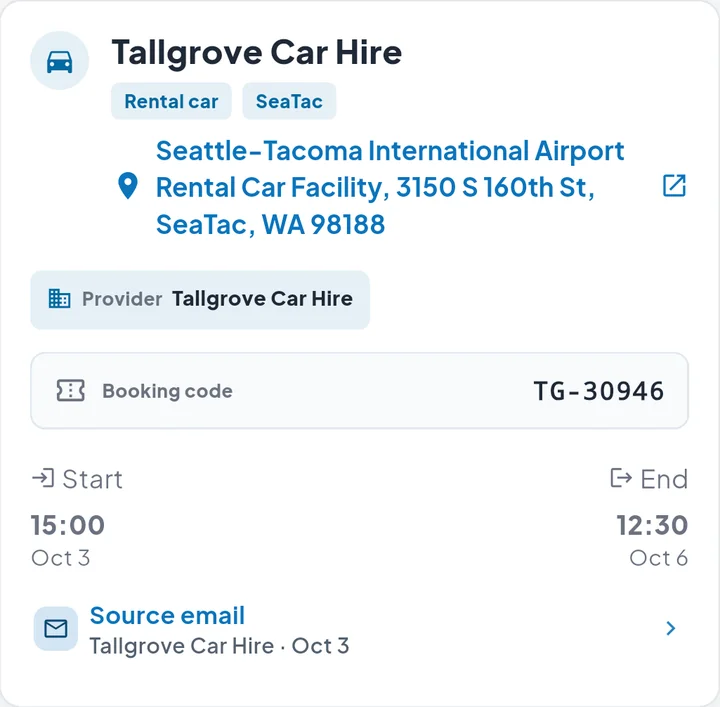
The Tallgrove Car Hire booking in TripCoral on Android: pick-up address at Seattle–Tacoma airport, booking code and pick-up and return times

Offline reliability

Travel without connectivity anxiety. Your flights, booking references and hotel addresses are stored on your device and open in airplane mode or a Wi-Fi dead zone.

01 · Forward

One email in. Nothing to type.

Forward a confirmation to [email protected] and TripCoral reads it for you: flights, stays, rental cars, parking, tours and tables. There’s no mailbox to connect — you share only what you forward.

  • Every booking links back to its original email
  • Mail TripCoral can’t read stays safe in your inbox
  • Forward from any of your addresses — personal or work — into one account
A forwarded Norrvik Travel flight confirmation in TripCoral on Android, marked as added to the Seattle trip, 3 to 7 October
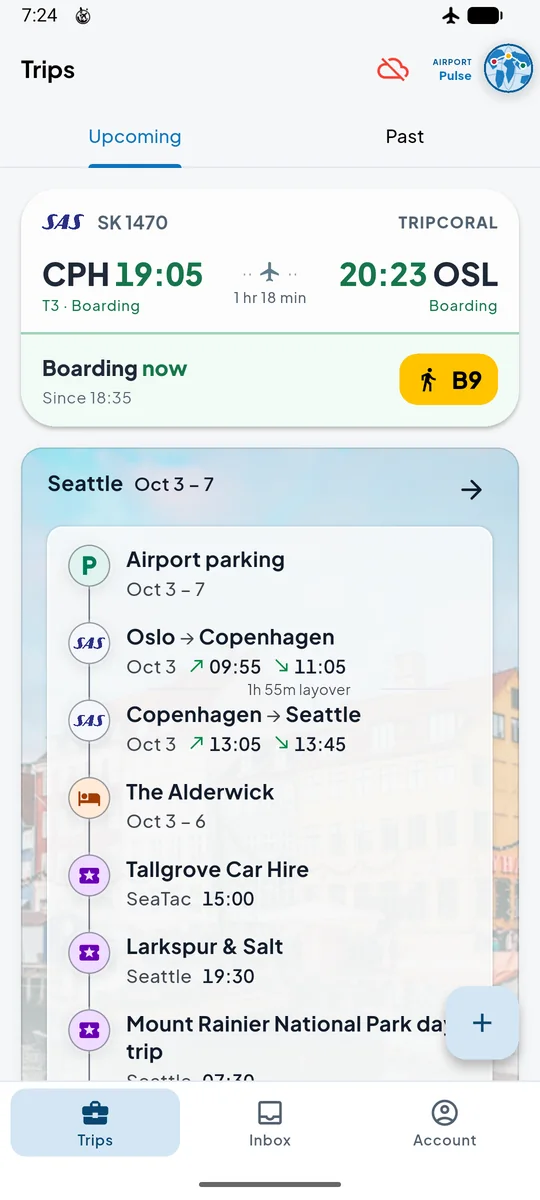
The Android Trips page: the live SK1470 card boarding at gate B9, and below it the finished Seattle trip over a photo of the city, from airport parking through the flights, the hotel, the rental car and dinner

02 · Organized

Your whole trip, beautifully organized.

Every booking falls into one timeline, in the order you’ll live it — the flight out, the hotel, the car, the table for two, the flight home. No email to forward? Add flights, stays and plans by hand, whenever you like.

  • Local time at every airport, as printed on your boarding pass
  • Add flights by number, and stays or plans by hand
  • Merge, split and edit trips
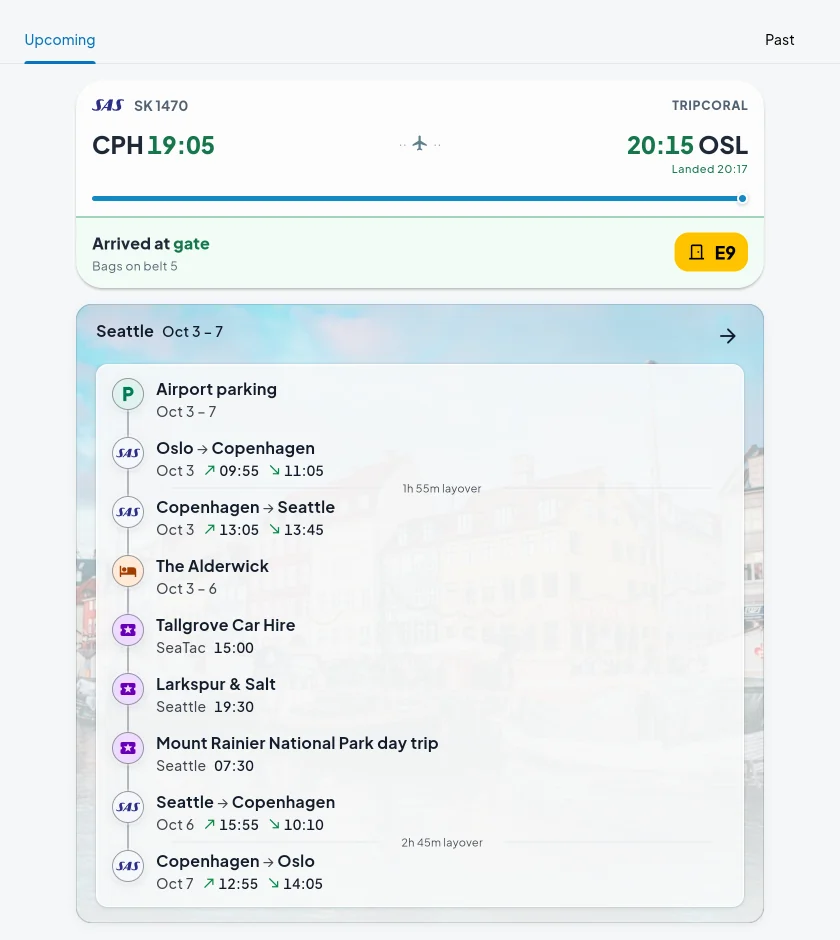
The TripCoral Trips page on the web: the live SK1470 card, arrived at gate E9 with bags on belt 5, above the Seattle trip over a photo of the city, every booking from airport parking to the flight home in time order
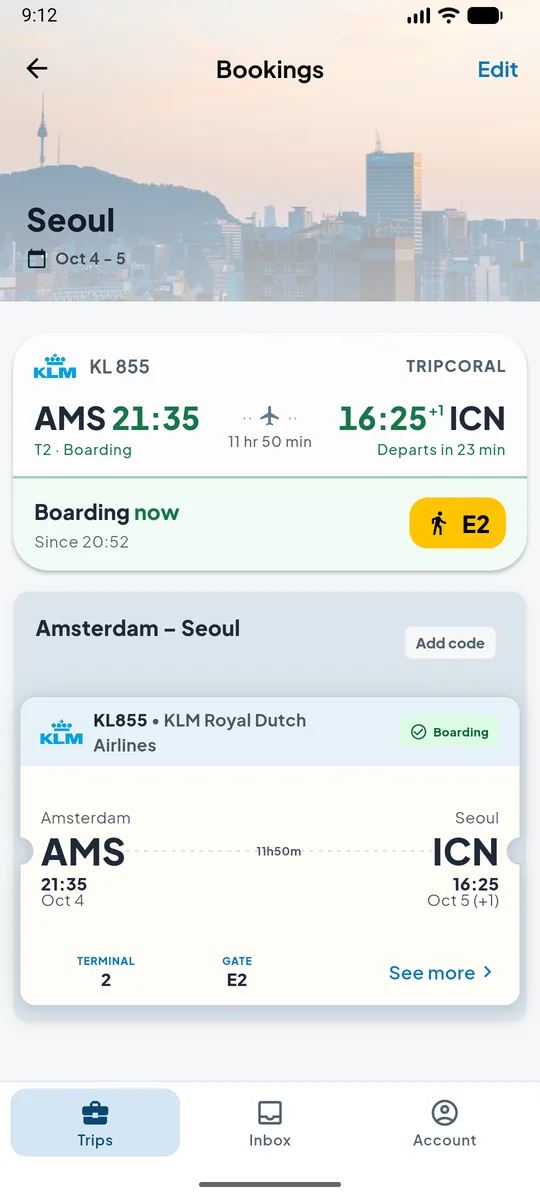
The Seoul trip on Android: a photo of Seoul over its bookings, the live KL855 card boarding at gate E2, and its one ticket, Amsterdam 21:35 on 4 October to Seoul 16:25 on 5 October, 11 hours 50 minutes

Two clocks. One trip. No math.Nearly twelve hours in the air, from Amsterdam at 21:35 to Seoul at 16:25 the next afternoon — each time in its own airport’s clock.

Travel day

Your flight, followed live.

TripCoral watches every stage of travel day — queue, gate, runway, air, belt — and tells you what changed as soon as it’s known.

03 · Before you go

Know your flight before you pack.

See how your flight has really been running, which aircraft is flying it and the turbulence forecast for your route. Open either airport for its weather, local time, delays and security queues right now — at US airports, live FAA traffic programmes too. Three hours before departure, a reminder brings your terminal, gate and check-in desk together.

  • Delay history: early, on time, late
  • Aircraft type, registration and livery
  • Weather, delays and queues at each airport
  • Turbulence forecast for your route
  • FAA ground delays and ground stops (US)
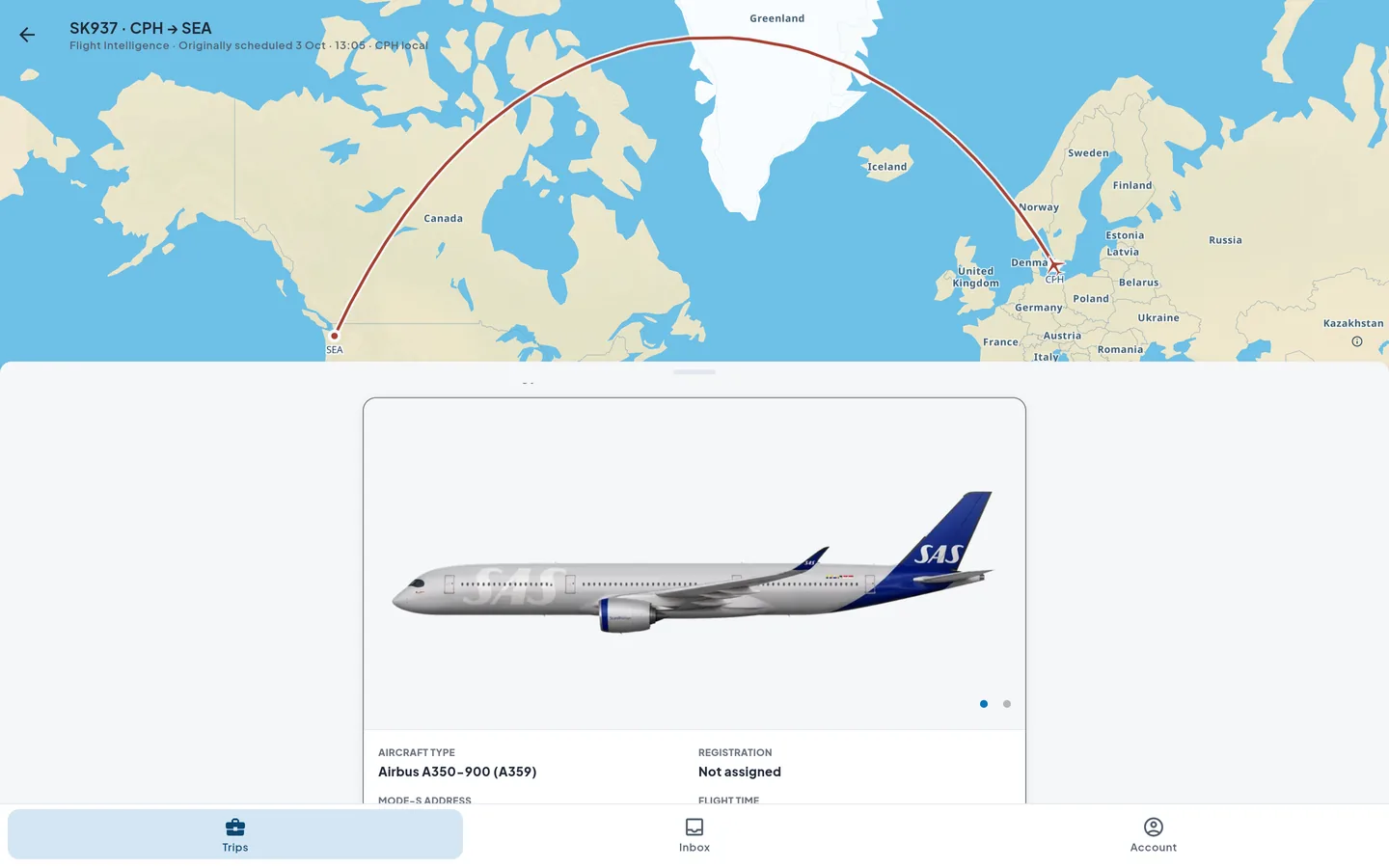
Flight Intelligence for SK937 on the web: the great-circle route from Copenhagen over Greenland to Seattle, and the Airbus A350-900 in SAS livery
The 3-hour reminder in TripCoral: All set for Oslo. SK1483 leaves in 3 hours, on time at 22:15, terminal 5, gate E1, check-in 71–75
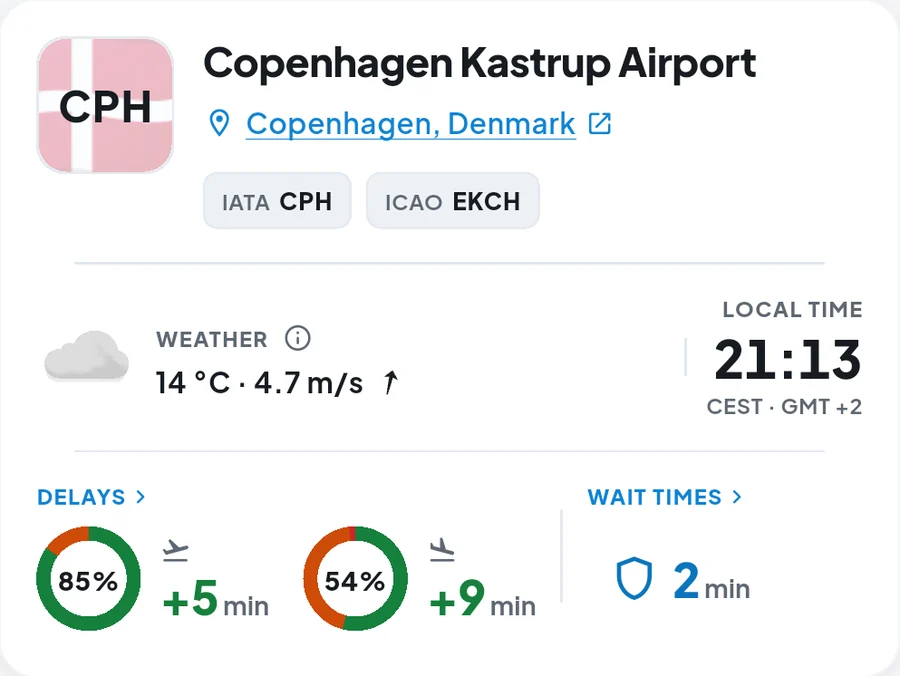
Airport Intelligence for Copenhagen on Android: 14 °C at 21:13 local time, 85% of departures on time at 5 minutes average delay, 54% of arrivals on time at 9 minutes, and a 2-minute security wait

04 · Alerts

You’ll be the first to know.

A delay or an earlier departure. A new gate, terminal or check-in desk. Boarding. A tight connection. Each change arrives as a push.

  • Delays, earlier departures, cancellations and diversions
  • Gates, terminals, check-in desks and connections
  • Aircraft changes and turbulence forecasts
  • Every alert has its own switch
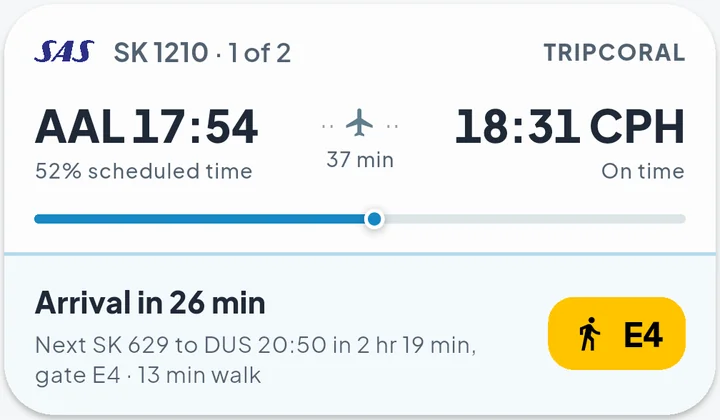
The live card for SK1210 Aalborg to Copenhagen, arrival in 26 minutes: next SK629 to Düsseldorf at 20:50 in 2 hr 19 min, gate E4, a 13-minute walk
The banner on landing in Copenhagen: SK1210 at terminal 3, gate B7; next SK629 from terminal 3, gate E4 at 20:50, a 13-minute walk
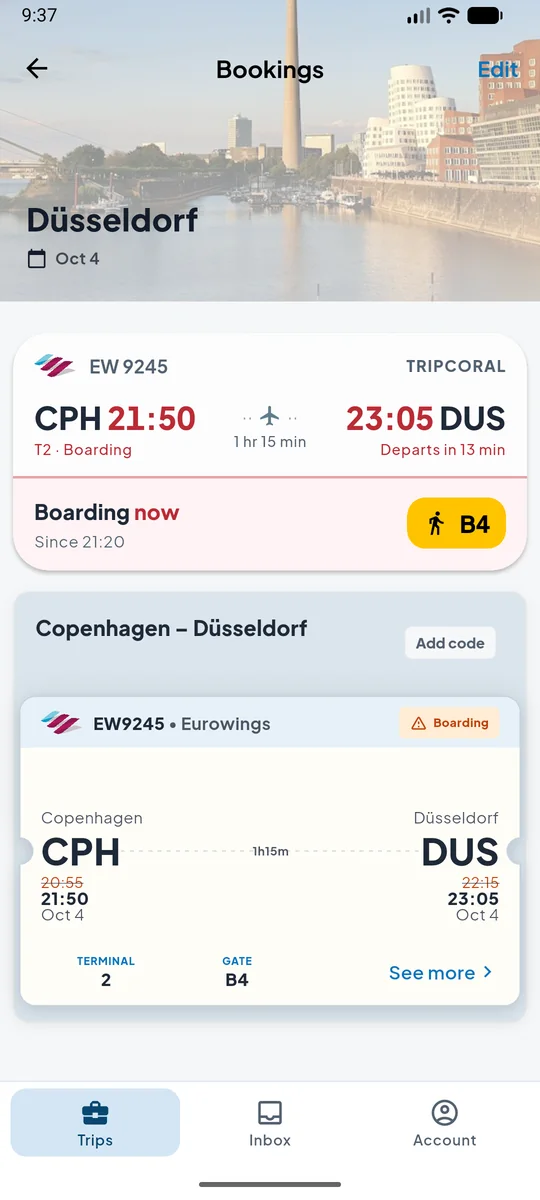
The Düsseldorf trip on Android with EW9245 delayed: the live card in red, Copenhagen 21:50 to Düsseldorf 23:05, boarding at gate B4, and the ticket with 20:55 struck through for 21:50 and 22:15 for 23:05

05 · Your plane

Know where your plane is.

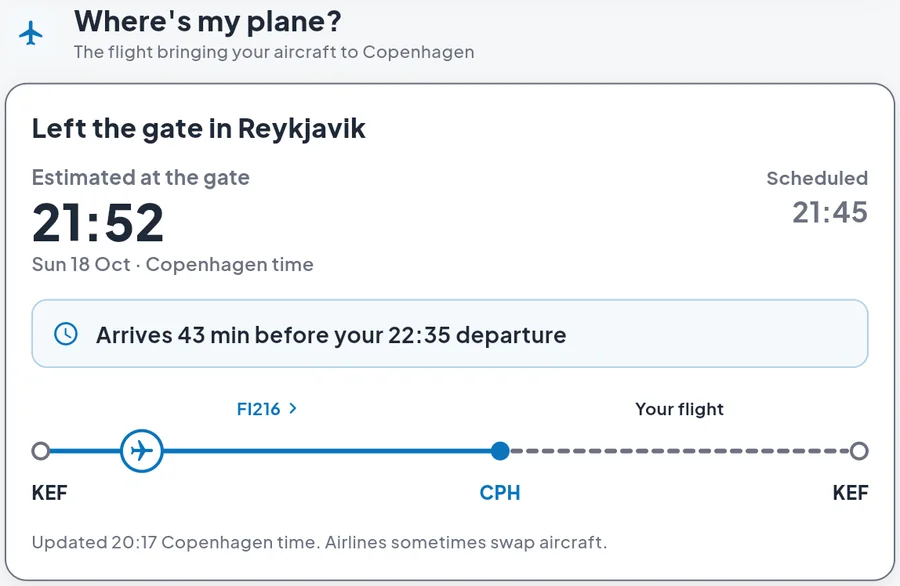
Your flight can’t leave before its aircraft gets there. Where’s my plane? follows the flight bringing it in — still at the gate, on its way or already landed — and says how long before your departure it arrives. Your live card carries the same fact in one line.

  • The inbound flight and where it is now
  • Its arrival time against your departure
  • Its arrival gate once it’s down
  • One tap opens the inbound flight
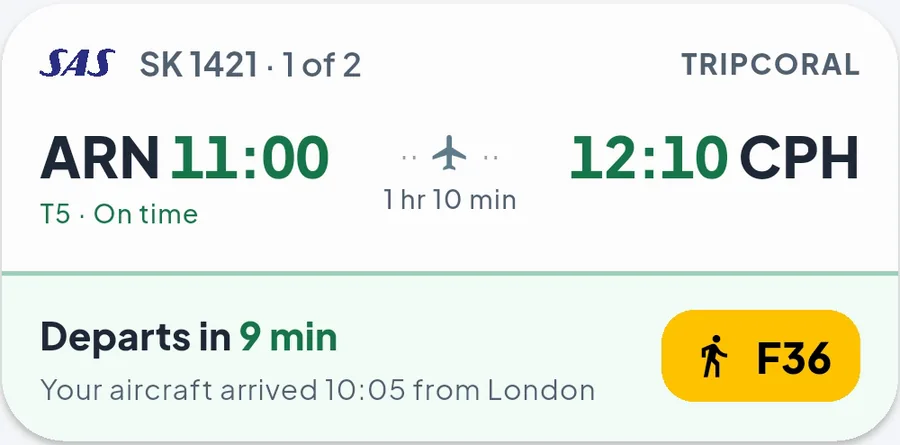
The live SK1421 card on Android: Stockholm 11:00 to Copenhagen 12:10 from terminal 5, departs in 9 minutes, walk to gate F36, and the line “Your aircraft arrived 10:05 from London”
Where’s my plane? on the web for Icelandair FI217 from Copenhagen at 22:35: the aircraft has left the gate in Reykjavik as FI216, estimated at the Copenhagen gate at 21:52 against 21:45 scheduled, arriving 43 minutes before the 22:35 departure

06 · Boarding

Gate to runway, one step at a time.

The live card moves with your flight — boarding, gate closed, pushback, taxi — with the walk to your gate always on it, and ends the taxi at your flight’s own runway estimate. On Android, the same card sits on your lock screen and in your notifications.

  • A live card for every stage of departure
  • Taxi and take-off estimates
  • Live notification on the Android lock screen
  • Coming to iPhone: Live Activity
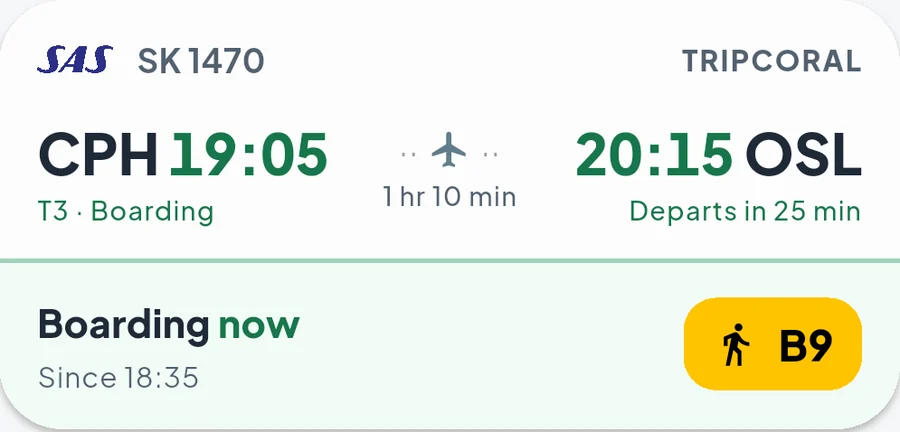
The live SK1470 card on Android while boarding: Copenhagen 19:05 to Oslo 20:15 from terminal 3, boarding since 18:35, departing in 25 minutes, with the walk-to-gate chip for gate B9
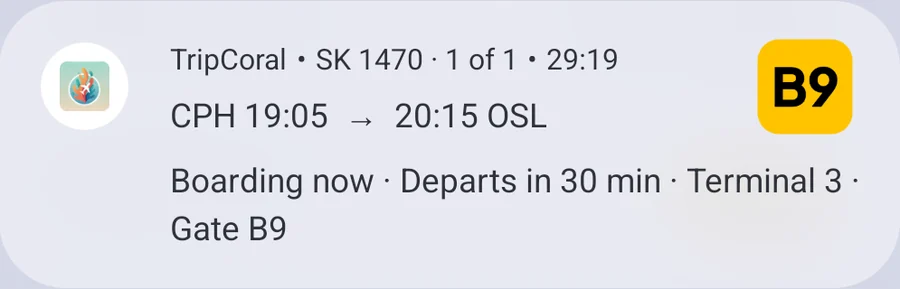
The same flight as a live update in the Android notifications: SK1470, Copenhagen 19:05 to 20:15 Oslo, boarding now, departs in 30 minutes, terminal 3, gate B9

07 · Arrival

Land knowing where to go.

In the air, your arrival time and gate stay current. On landing: your arrival gate, then the belt your bag is on — at airports that publish it, like Oslo, Stockholm and Dublin. Changing planes? Your walk from gate to gate, with its distance and walking time.

  • Arrival estimate, kept current
  • Arrival gate and baggage belt, as a push
  • Gate-to-gate walking time on connections
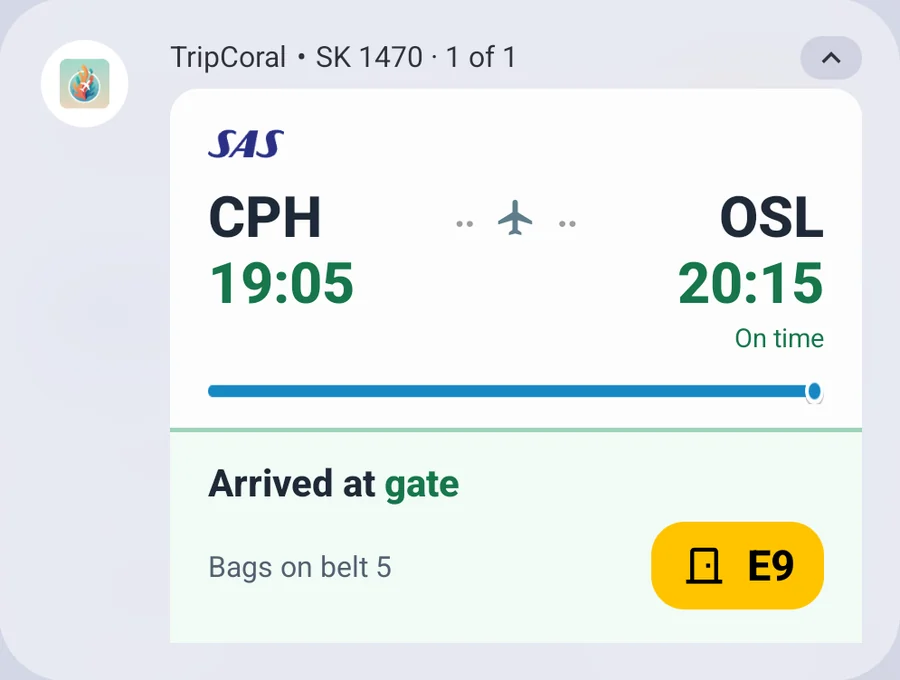
The live update in the Android notifications after landing in Oslo: SK1470 from Copenhagen arrived at gate E9, bags on belt 5
The push on landing: Welcome to Oslo. SK1470, gate E9, bags at belt 5
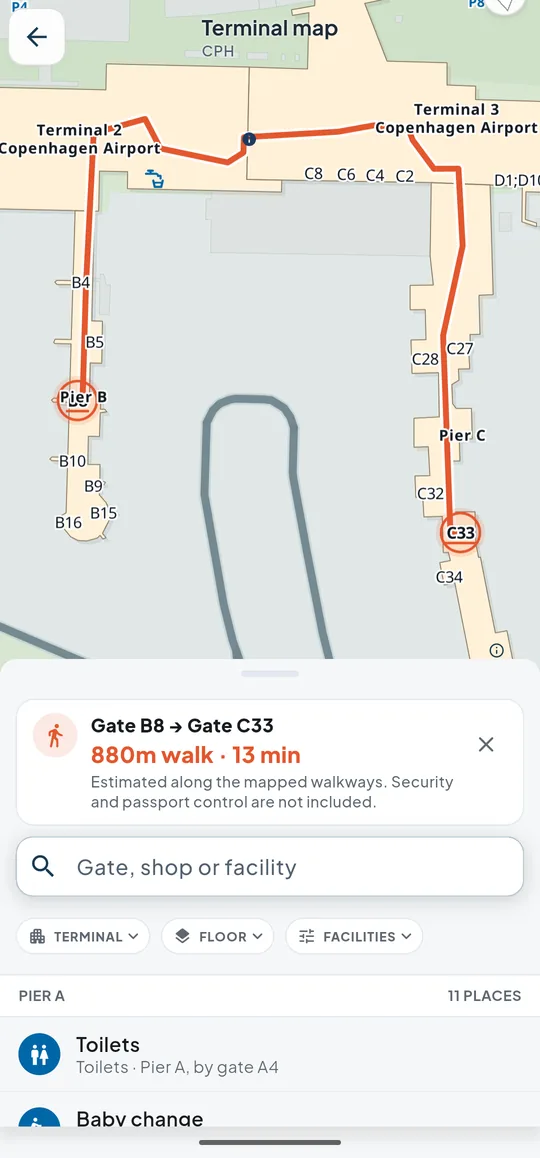
The Copenhagen terminal map on Android with the walk from gate B8 to gate C33 drawn on it: 880 metres, 13 minutes along mapped walkways

08 · Always

Works in airplane mode.

Your trips live on your device, so booking references, hotel addresses and times open without a signal. And every past trip stays close for next time.

  • Offline access to every booking
  • Past trips kept on your device
  • On the web and Android · coming to iPhone
TripCoral on Android in airplane mode: the airplane icon in the status bar and the red offline cloud in the app bar, with the SK1470 card and the whole Seattle trip still open
TripCoral trips on iPhone, a simulated preview
Coming to iPhone · preview

Explore · No trip needed

Airports, live on one map.

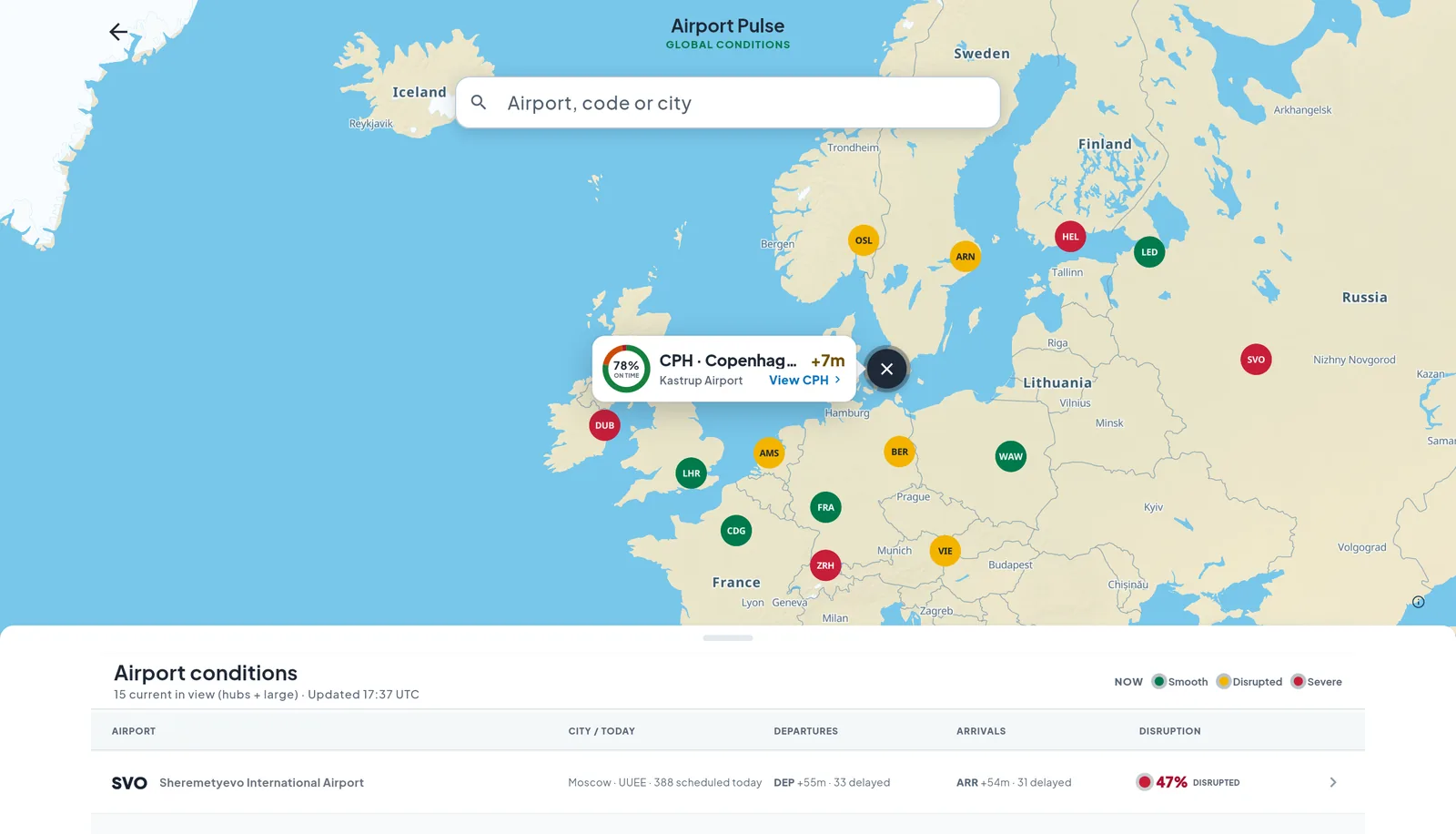
Airport Pulse colours airports by how their flights are running over the last hour and the next two. Tap one to open its departures and arrivals boards and its queues at security and passport control.

Airport Pulse on the web at 17:37 UTC: Europe with each large airport coloured by how its flights are running — Frankfurt, Heathrow, Paris–Charles de Gaulle and Warsaw smooth; Oslo, Stockholm, Copenhagen, Amsterdam, Berlin and Vienna disrupted; Dublin, Zürich and Helsinki severe — with Copenhagen selected at 78% on time and 7 minutes average delay

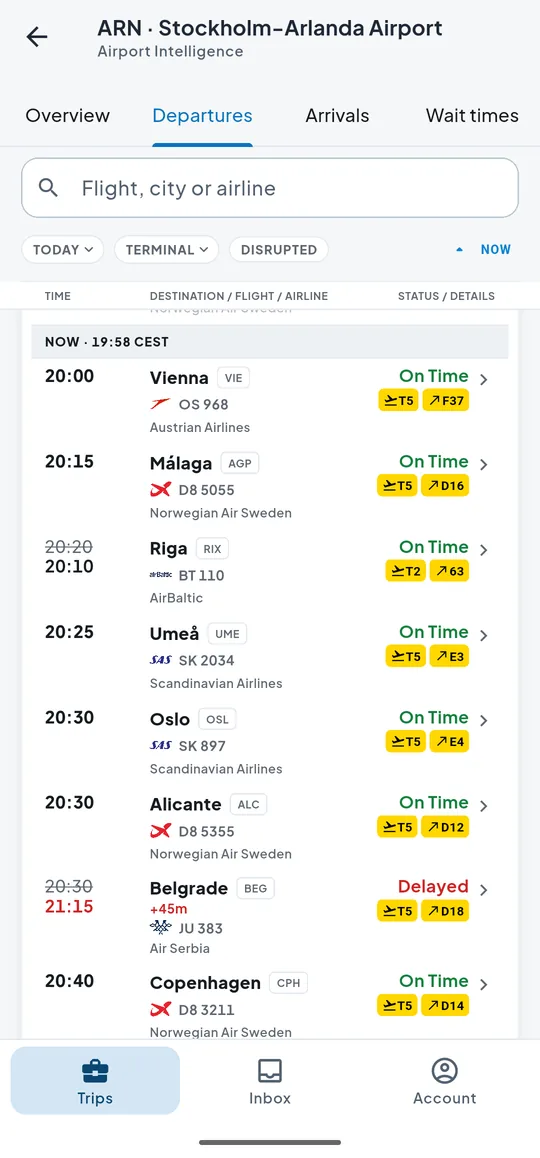
ARN Departures

+45 min

Air Serbia JU 383 to Belgrade is now due out at 21:15, not 20:30. Arlanda departures show their terminal and gate.

The Stockholm Arlanda departures board on Android at 19:58: Vienna, Málaga, Riga, Umeå, Oslo and Alicante on time, and Air Serbia JU 383 to Belgrade delayed 45 minutes to 21:15, each with its terminal and gate

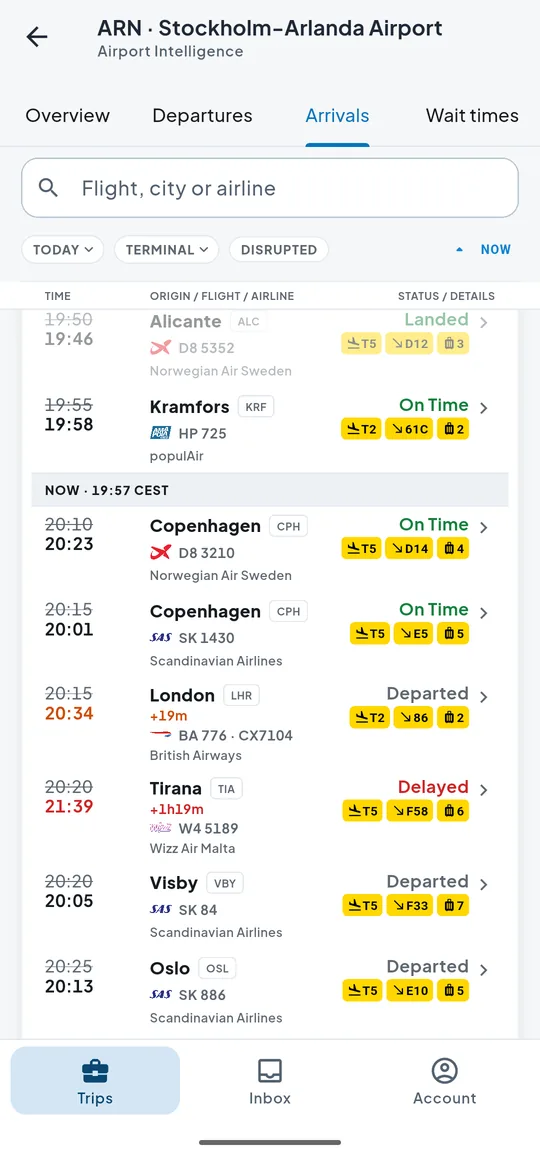
ARN Arrivals

Belt 6

Wizz Air W4 5189 from Tirana, 1 h 19 min late, comes in at gate F58. Arlanda arrivals show their terminal, gate and belt.

The Stockholm Arlanda arrivals board on Android at 19:57: each flight with its terminal, gate and baggage belt, among them Wizz Air W4 5189 from Tirana 1 hr 19 min late at gate F58 with bags on belt 6, and British Airways BA 776 from London 19 minutes late with bags on belt 2

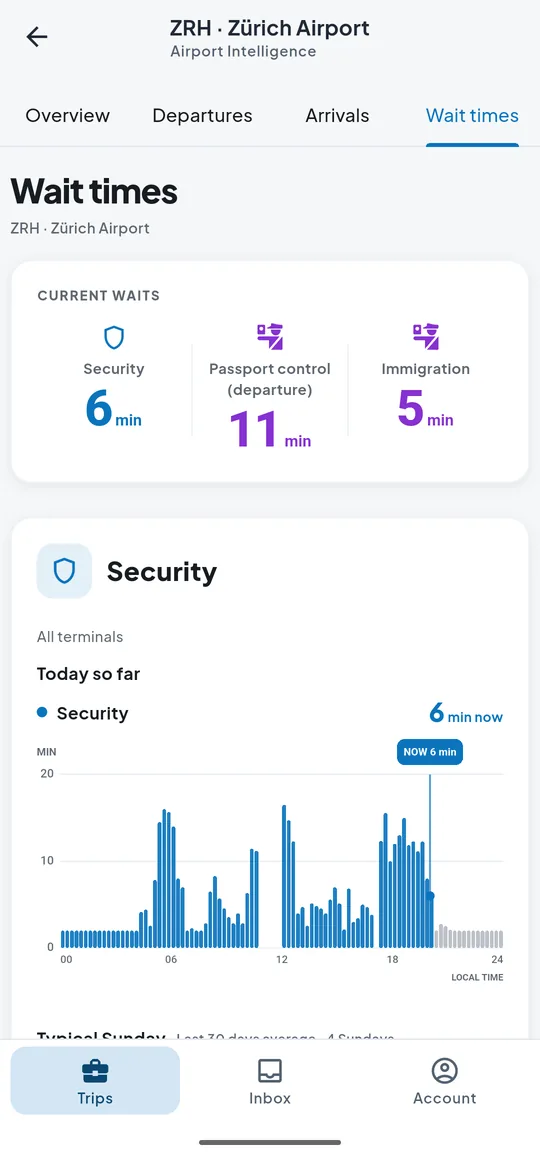
ZRH Queues

Security
6 min
Passport out
11 min
Passport in
5 min

Zürich at 20:02: security, passport control on the way out and on the way in, with today’s queue by the hour.

Wait times at Zürich on Android at 20:02: security 6 minutes, passport control on departure 11 minutes and immigration 5 minutes, with today’s security queue by the hour

Boards at airports where TripCoral follows every flight; queues where the airport publishes them.

Coverage you can verify

1,500+airports170+countries and territories

Check the live coverage map before you fly: colour shows how much of each airport TripCoral follows.

Explore the coverage map

Questions, answered.

How does forwarding a booking email build a trip?

Forward the confirmation to [email protected] from any address on your account. TripCoral reads the flights, hotels, rental cars, parking, tours and restaurant tables in it and puts each booking on one timeline, in the order you’ll live it, linked back to its original email. There’s no mailbox to connect: TripCoral sees only what you forward. You can also add flights by number, and stays or plans by hand.

Which airlines, airports and bookings does TripCoral cover?

TripCoral reads the confirmation itself, so bookings aren’t limited to a list of partner airlines, hotels or travel agencies. Live flight tracking covers 1,500+ airports in 170+ countries and territories. At airports with a direct feed, TripCoral follows the whole departures and arrivals board; elsewhere it checks the flights you save through wider flight-tracking networks. The coverage page lists every airport.

How does TripCoral track delays, gates, boarding and baggage belts?

TripCoral follows each saved flight on airport departure and arrival boards, airline sources, wider flight-tracking networks and, at US airports, FAA air traffic data. When the departure time, gate, terminal, check-in desk or boarding changes, the live card updates and a push notification arrives. After landing you get your arrival gate and the baggage belt your bag is on, at airports that publish it, like Oslo, Stockholm and Dublin.

What happens to my email data?

TripCoral receives only the emails you forward; forwarding gives it no access to your mailbox or password. Each email is read to find your reservations, with Google Gemini doing the extraction, and TripCoral does not sell your personal data. You can delete your account and all its travel data at any time from Account Settings. The Privacy Policy has the details.

How much does TripCoral cost?

TripCoral is currently free to use, live flight tracking and alerts included.

Which devices does TripCoral run on?

TripCoral runs in a web browser at app.tripcoral.com and on Android, where the beta is by invitation: write to [email protected]. An iPhone app is coming. On Android, your trips are stored on the device and open offline.

Start with one email.

Open TripCoral on the web, then forward your next confirmation to [email protected].

Android beta by invitation: write to [email protected] · Coming to iPhone